2015年9月18日星期五

PIN Code Reading Key Programming For Renault K-Line (1996-2013 Year) Procedure


PIN Code Reading and Key Programming Procedure:

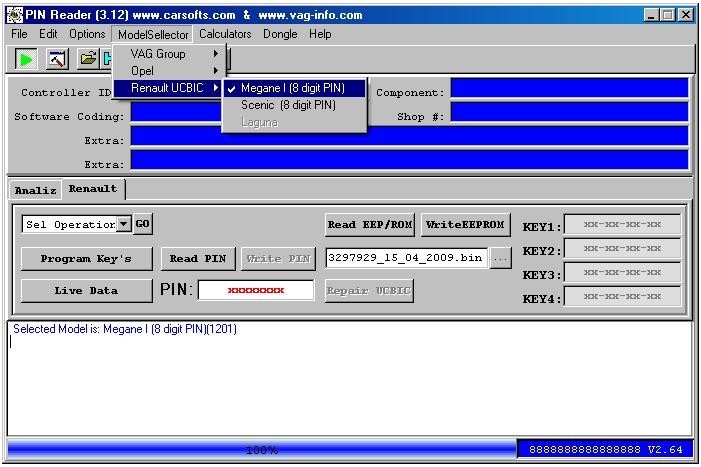
Start PINReader.exe VER 3.12 Select from Model Selector "Renault UCBIC" - "Megane I (8 digit PIN)" or "Scenic (8 digit PIN)". Click "Program Key's" for PIN reading and Key programming...


After Read PIN code started "Renault Megane/Scenic Key programming procedure".
After this message insert first Key to program. Switch On Ignition


After "Switch OFF Ignition" first Key is programmed.


Programming procedure for the next key is analogous...


Manual entering PIN code


Read Live Data from UCBIC Module


Read and change Setup IMMO parameters


Renault CAN Clip Diagnosis Interface Setup Instruction


Check the attachment about " Renault CAN Clip setup instruction,Renault Clip setup manual,Renault supported language and compatible car market".


Renault Can clip setup three main steps:
First step: set your PC language as English.
Second step: install "Crack".
Third step:  install “setup.exe”, at this step, you can select the language you want.
Renault can clip 5 days left for registration:
During usage Renault Can clip, when this icon appears,it reminds you 5 days left for registration, you have three options to solve this problem:


Option one : change your computer system time. Because this system works in the following 5 days once you register SPX computer, please change the computer system time at any day earlier than the day you register SPX computer. For example, it is 24th today and you do SPX computer registration, then when this window appears, please set the computer time as 25th. When you come to 28th, please change the system time to 29th, or 30th.
Today it is 24th as follows:

 Change as 25th as follows:


Option two: 
press ctrl+alt+delete, then go to Windows Task Manager


Select "Process" to find RSRwin.exe, then "End Process"


Notes:

1. Be sure to disable/uninstall anti-virus software 
Please note,anti-virus software can flag up Renault CAN Clip software as having a virus. This is a false positive and is due to the software containing the application file. So Before setup the device software, please disable/uninstall anti-virus software or install a more reliable free virus scanner! Our Renault CAN Clip software is completely safe and virus free and all other virus scanners confirm this.

If the software data is destroyed or lost because you forget to disable/uninstall anti-virus software, please contact our customer service, we arrange to resend you CD or send you the software via internet.

2. Required windows operation system is windows XP 
Be sure to setup and run the device software under windows XP. Otherwise the device software and program can be broken or it will fail to work.


2015年9月16日星期三

Difference between Digiprog 3 and Digimaster 3


Digiprog IIIDigimaster III
Software VersionV4.941.8.1407.14
Screen SizeSmallerBigger
Power- on password1No need password
Language SupportedDeutsch, English, Espanol, French,
Portuguese,Italiano, Turkish, Nederlands
English
Way to change mileageBy OBD2 or dashboardBy OBD2 or dashboard
UpdateUsers are not allowed to update by
themselves (Need to update by update email of
 or send the interface back to update.)
Original and update online by
users anywhere anytime, and one
 year free update.
Vehicle listFor universal car, but cover less vehicle
models than( digimaster 3. Cannot do well
For Ford, For Benz, BMW, Opel , digimaster 3
 can do.
The Best odometer tool for universal car,
such as it can change mileage For ford,
BMW, Toyota, Benz, VW, Audi,Volvo,
Renault,Peugeot and high-end cars.
Vehicle yearCovers vehicles from 1996 to 2013(some
can do 2014 year) the vehicle year it covers differs one from the other based
 on specific vehicle
Covers vehicles from 1996-2014,
the vehicle year it covers differs one from
 the other based on specific vehicle.
TokensNo tokens limitedItem No.SP78 no token limitation,
Item No.SP78-B with 980 Tokens
FunctionMainly for setting and programming
digital speedometer.
odometer correction, Audio
decoding, airbag resetting  engine ECU resetting, IMMO,
programming key for Benz &BMW etc
DifferenceIf you want one mileage correction device to do most normal brand cars, you can choose Digiprog3 is enough.But for the new and high-end cars,
you need to use Digimaster 3.

At the same time, if you want to choose one multi-function mileage correction,
the Digimaster 3 is the best choice. Digimaster 3 contains the advanced technology
 of programming new keys for BMW and Benz, CAS-BDM reading/writing and resetting;
35080V6 erasure etc.


Xtool PS2 Truck Diagnostic Tool Packing List


添加图片说明


2015年9月15日星期二

Difference between GM Tech 2 and GM MDI


Difference between GM Tech 2  and GM MDI:


ContentGM Tech 2  GM MDI  
LanguageGM-English, Germany, Spanish , Japanese, French, Thai , Portuguese, Korean
SAAB-English
OPEL-English, Italian , Germany,Spanish
HOLDEN-English
SUZUKI-English
ISUZU-English
Multi-language: English, French, German, Japanese, Italian and so on.
Total 30 languages to choose.
UpdateVia 32MB Software Cardcan not update
Activationno need activeyes
Advantagecannot plug original software card, but can support original programcan support software from original factory
OS requirementno need connect to the PCWin XP only
Internet connectionno need connect to the PCcan not connect to the internet then install the software, because once connect internet, it will remind you update the software
Support Car ModelCannot support truck, only for cars, Support all GM systems 1992 thru current year. such as GM/ SAAB/ OPEL/ SUZUKI/ ISUZU/HOLDENMDI can test all GM car from 1990-2012 year.
Support programingsupport reprogramming, but need to use with TIS2000 togethersupport offline program,such as chevrolet,opel, but not for all cars


GM TECH II Diagnosis Tool FAQ

About After-Sales Questions and Answers 
Q1: I bought one GM TECH2 and the TIS2000 software can’t be installed and no identification, what's the problem?
A1: If the TIS2000 you are trying to install is contained in the GM TECH2 software, then it is useless to install TIS2000 software. To program electronic control unit, I advice you buy an extra TIS2000 to work with GM tech2.
Q2: After receiving GM TECH2, I got some errors.
A2: If it is Blue screen, just replace the Blue Screen Chip. If it is not the problem of Blue screen, please send us the self-test report to check where the problem is; have no idea on how to operate self test? Refer the self-test manual at GM TECH2 “technical support / service”.
Q3: GM TECH2 one button doesn’t work how to fix?
A3: If you have new version GM tech2, there are two ways to solve: 
1) we send you a new button to replace; 
2) please send back to repair. If you have old version GM tech2 installed with the newest software, the button maybe won’t work.
Q4: When I use GM TECH2 for the second times, the tool starts to smoke, and my car voltage become 14V from 12V, what’s the matter?
A4: Please follow the correct operation steps: before diagnosing, turn on the ignition and then connect the GM TECH2 with the car, when the car starts you’d better test the voltage, because during this process a part of cars’ voltage will reach up to 24V or more, especially the car which has a poor contact of electrical ground.

About Compatible Vehicle Models and Years
Q1: GM TECH 2 contains Saturn software?
A1: yes, Saturn software is included in the GM software English and support from 1991 to 2010 year.
Q2: Is GM TECH 2 available on my Cadillac year 1996? 
A2: Yes, GM TECH 2 works with Cadillac.
Q3: Does GM Tech 2 work with Australian Holden 1998?
A3: GM tech2 is only compatible with North American Holden, and our software for Holden only work with Holden from 1999-2012.
Q4: Can GM Tech2 work diagnose 2005 GMC - Sierra 1500 truck?
A4: Want to use our GM tech2 to diagnose truck, you need to buy an additional truck adapter, because our GM tech is compatible with truck, but only packed with the car adapter.

About Function
Q1: Does GM tech 2 Support Coding?
A1: Yes, it does, but you need to buy an additional TIS2000, TIS2000 support cars programming until 2007 year.
Q2: Can TECH2 support key coding and electronic control unit programming for all OPEL and Isuzu?
A2: GM tech 2 can't support key programming; as for electronic control unit programming, you need to additionally buy a GM TECH2 and a TIS2000, but TIS2000 only support GM and Opel, not support Isuzu.
Q3: GM TECH 2 support airbag reset? If not, please recommend me another one tool, my car is Chevrolet Tahoe 2007 year.
A3: Yes, GM TECH II support airbag reset for Chevrolet Tahoe 2007 year.
Q4: Does GM TECH II support reading Car VIN number? How to read?
A4: Yes, it does. After selecting the car model, enter function menu, and you will find the VIN number reading option.
Q5: I'm interested in the GM Tech2 Diagnostic Tool and I would like to know which diagnostic functions that tool has for a Hummer H3. I have problems with the windshield wipers, the tire pressure control system and the cruise control. Is that tool able to read the trouble codes and to read some parameters regarding those controllers?
A5:  GM TECH 2 contains Hummer H2 H3 software (from 2007 to 2010 year), so Tech2 is able to diagnose Hummer H3 2007-2010 year.  As for reading parameters regarding those controllers, it is theoretically compatible, advice you have a try.
Q6: Can GM Tech 2 send commands to the various modules and is it able to do diagnostics on a climate control programmer? To what year is the scanner effective? I own a 1997 Cadillac DeVille and a 2001 Chevrolet Venture.
A6: Yes, you can use GM TECH 2 to diagnose climate control programmer, when it has communication GM Tech2 can send commands to the modules.